
Order Screen F10 – Lines of Business (LOB)
Using the F10 function from the order screen will allow you to query the “Lines of Business” or display this information from any queried Pro. NOTE: This field is populated from information found in the EDI 204 Load Tender.
From SWS main menu go to Customer Service, left click on Order Entry, then left click on Order. Next, type a “Q” to “Query”. Then, press the F10 Shpmnt Detail button. (As below)

The below screen will display:
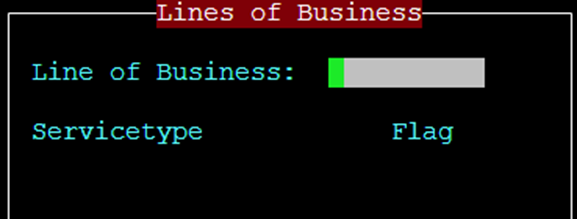
Users can Query (not Update) the “Line of Business” (LOB) field using four (4) different criteria:
FAK – Freight All Kinds
KA – Key Accounts
HCR – Healthcare/Reefer
TRNSLD – Transload
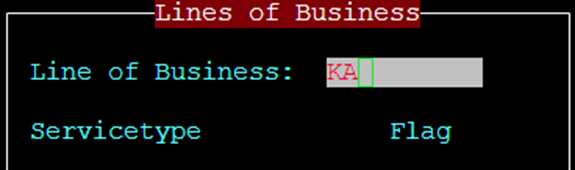
Type the desired LOB criteria above in the “Lines of Business” field, then press the <Esc> key. The below information will populate including the number of records (Pros) matching that criterion.
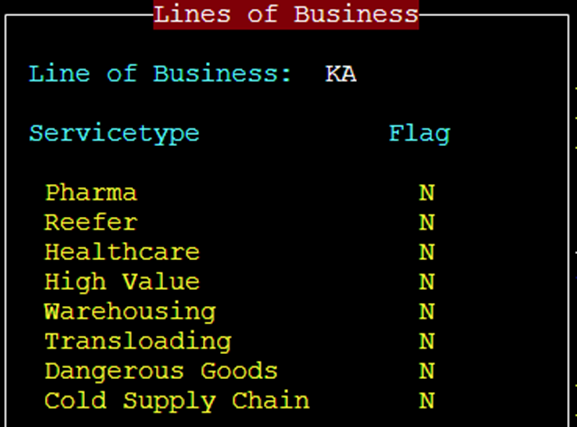

Additionally, when a Pro (or Pros) have been queried, press the F10 Shpmnt Detail button to view the “Lines of Business” for that Pro.
NOTE: Service Types cannot be queried at this time. In future, these flags will be an indicator of the driver type to assign to the move.