
As our brokerage divisions across the Enterprise have evolved, there are times when a freight rate needs to be updated even after the Vendor has completed the move(s). The process outlined below will not only save users time but will also prevent the vendor/carrier from having to resubmit information already entered in IMCPower if a brokerage order is voided and resent.
To Change the Vendor Freight Rate:
In the Order screen with the Pro displayed and in “Update” mode, press the “F8” button to display the Accessorial Sales/Vendor Cost window. (As below)
Next, navigate to the “Vendor Costs” section and with the applicable Vendor line highlighted, hit the <Enter> key to open the “UPDATE Vendor Cost Item” window. Next, with the “FRT FREIGHT” line highlighted, hit the <Enter> key. Next, enter the correct Freight Rate in the “$Unit” field and then hit the <Tab> key. The “$Total” field will update with the newly entered amount. Hit the <Esc> key to save the changes. In the example below, the original FRT rate (and corresponding VDO) was $250.00 but was adjusted to $225.
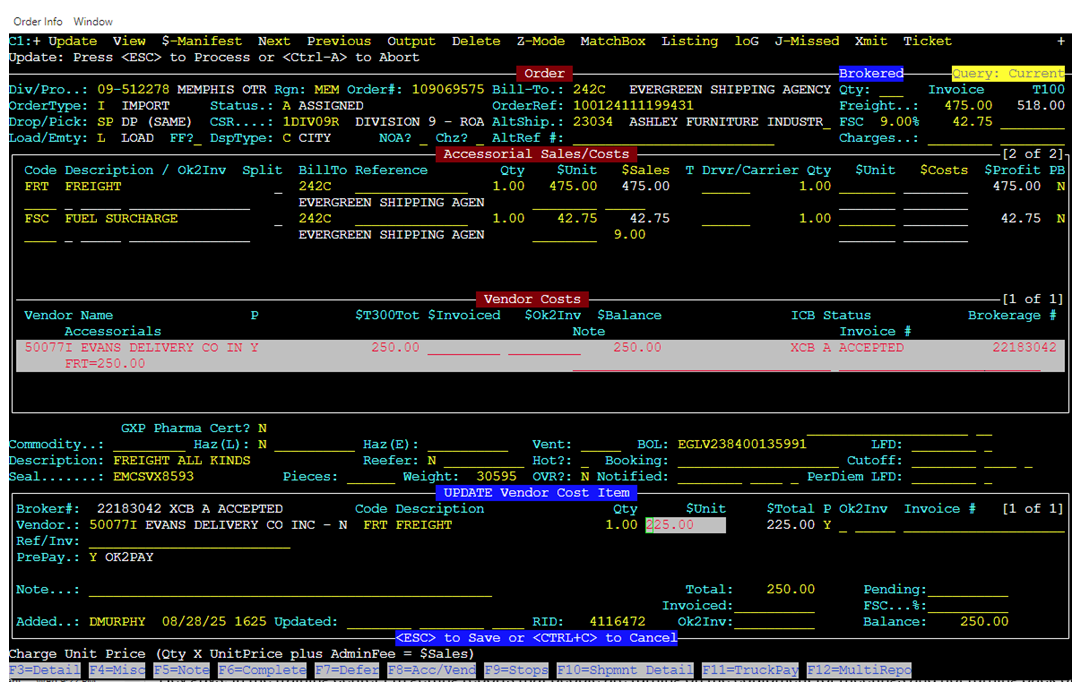
The “Vendor Pay” line in the Pro will update to the correct amount AND a new ***REVISED*** VDO will be generated and emailed to the Vendor.
NOTE: If the Vendor has already been paid, you will see the message below advising no changes can be made to the Vendor Costs. At this point, a C&D adjustment would have to be submitted if an incorrect rate was paid to the Vendor.
