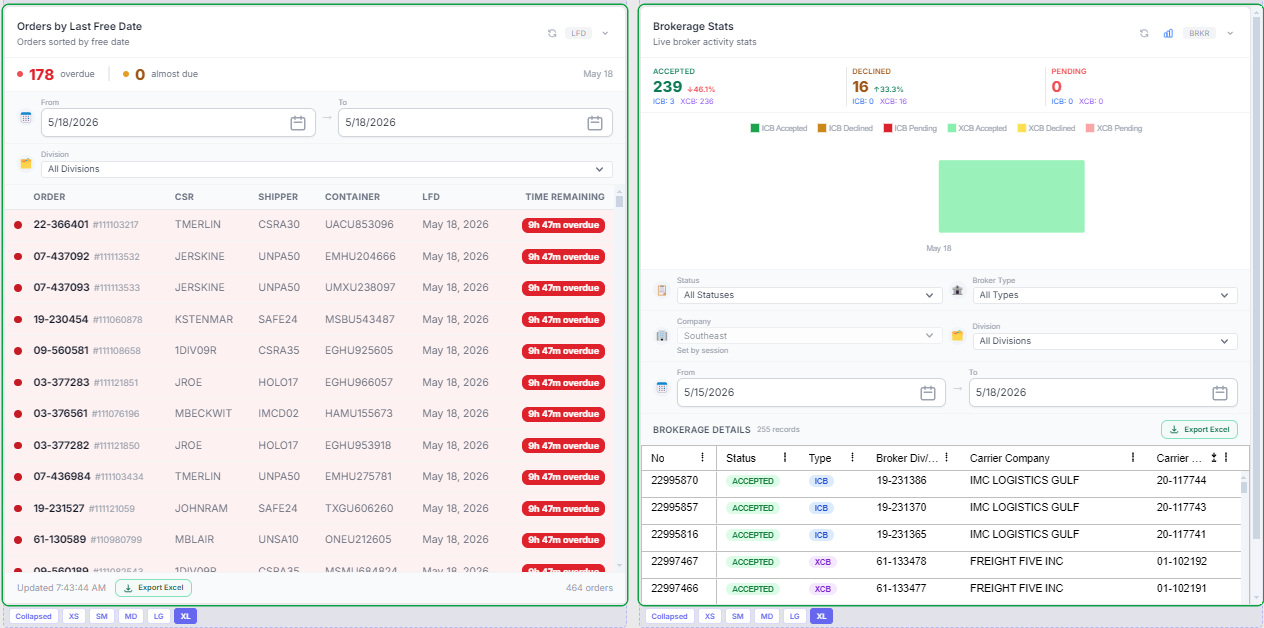
What the SWS Dashboard Is
A real-time workspace for CSRs and operations to quickly monitor orders, EDI 204 activity (future enhancement), and brokerage responses, with a focus on identifying items that need attention.
Purpose of the SWS Dashboard
The SWS Dashboard provides Customer Service Representatives (CSR’s) and operational users with a real-time snapshot of orders, EDI activity (future enhancement), and brokerage performance. It is designed to help you quickly identify items that need attention, monitor daily workload, and drill into details without running separate reports.
By default, the SWS Dashboard will display once a user signs into SWS and the main menu launches. Located at the bottom right of SWS main menu, the toggle next to “Dashboard” will be in the righthand position. (As below)

To “hide” the SWS Dashboard, left click on the toggle. (As below)

A sample snapshot is below: