The Dispatch Optimizer (D.O.) includes an equipment validation feature that alerts dispatchers when a selected chassis or container is marked as damaged in the Depot System.
This helps prevent dispatching equipment that may not be serviceable while still allowing dispatchers to proceed when necessary.
A warning message will display when all of the following conditions are met:
The chassis or container status = in the Depot System
The dispatcher attempts to transmit the move
The move originates from an IMC Operated Depot
Note: This warning only appears for moves out of IMC Operated Depots
When triggered, the system displays a Dispatch Equipment Check message.
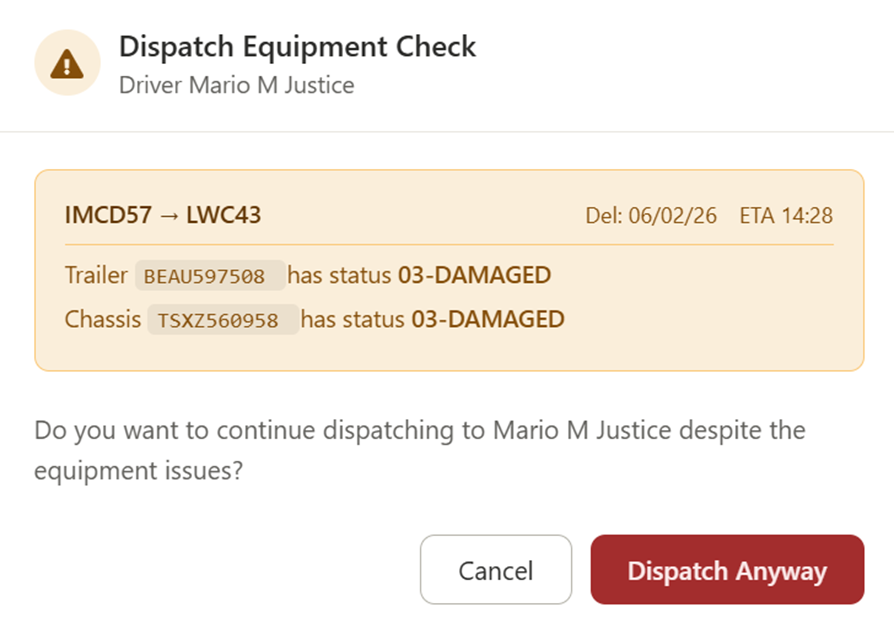
Move information (Origin → Destination)
Delivery date and ETA
Equipment details:
Trailer number and status
Chassis number and status
Prompt asking if the dispatcher wants to continue
Trailer: BEAU597508 — Status: 03-DAMAGED
Chassis: TSXZ560958 — Status: 03-DAMAGED
When the warning appears, the dispatcher has two options:
Stops the dispatch
Allows the dispatcher to:
Assign different equipment
Investigate the issue further
Overrides the warning
Proceeds with transmitting the move to the driver
Dispatchers should:
Review the equipment status carefully before proceeding
Cancel the move if:
Alternative equipment is available
The damage may impact serviceability or safety
Use Dispatch Anyway only when:
The move must proceed
The equipment is confirmed acceptable for use
The warning is driven by Depot System status (03 Damaged)
It acts as a checkpoint, not a hard stop
Dispatchers maintain full control to proceed or cancel
Applies only to IMC Operated Depot outbound moves
