The Void function on the Order screen allows users to void (delete) an order once a Pro has been queried. Voiding does not remove the order from the system — it changes the order's Status to Void, marking it as no longer active.
Important: Only an unreleased order — one where the Status field is blank — can be voided. Any equipment moves on the order must be unassigned and/or deleted before the order can be voided.
Use the Void function when you need to:
Delete/cancel an unreleased order that should no longer be active.
Correct an order that was created in error before it has been released.
Remove void status from an order that was voided by mistake.
Query the Pro on the Order screen.
Locate the Void button in the top right corner of the screen. (As below)
Left-click Void.

NOTE: The order must be unreleased (Status field blank) and have no equipment moves assigned. If moves are still assigned, an error message displays: "Cannot void order — Order cannot be voided – it has [#] moves assigned." Left-click OK to dismiss the message, then unassign and/or delete the moves before trying again.
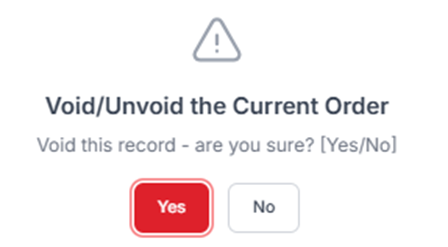
After left-clicking Void, a confirmation message displays: "Void this record - are you sure? [Yes/No]" (As below)
Left-click Yes to confirm, or No to cancel.
Important: If the order still has equipment moves assigned, the system blocks the void and displays "Cannot void order – it has [#] moves assigned." (As below)
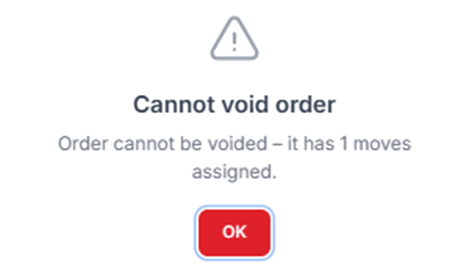
Left-click OK, then unassign and/or delete the moves before repeating steps 1–2.
Once confirmed, the order's Status field updates to Void, and the button in the top right corner changes from Void to Unvoid. (As below)
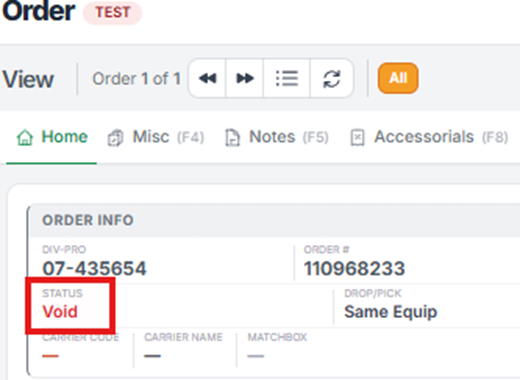
On a voided order, locate the Unvoid button in the top right corner of the screen. (As below)
Left-click Unvoid.
A confirmation message displays: "Already voided - do you want to remove void status? [Yes/No]" Left-click Yes to remove the void status, or No to cancel. (As below)

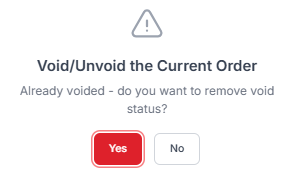
Once confirmed, the order's Status field clears, the order is active again, and the button in the top right corner reverts from Unvoid back to Void.
