
To access the Location Profile Screen from SWS main menu, go to Customer Service, left click on File Maintenance, then left click on NewLocationProfileScreen
NOTE: It is not possible to DELETE an LP record once created. When in “Update” mode, if you can click within a certain field, that information can be edited. The business address cannot be changed. In this case, users must update/change the record to “Inactive” then create a new LP record with the correct information.
If a new LP record is added in error, it will be necessary to:
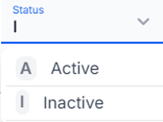
1. UPDATE the “Status” on the incorrect LP record to “I” for “Inactive”, then left click on the “Save” button located at the top right of the screen. (As below)
2. Create a NEW LP record with the correct information.