Driver Wait Settings define the parameters used to calculate driver wait time pay when a Location Profile is configured in the Driver Dwell Portal.
These settings control who is eligible for wait time pay, how much free (unpaid) time is allowed, and the maximum amount of time eligible for autopay at a specific location.
First, query up the desired Location Profile record on the Location Profile screen.
Once the record is displayed, locate the Driver Wait Settings section on the screen. (As below)
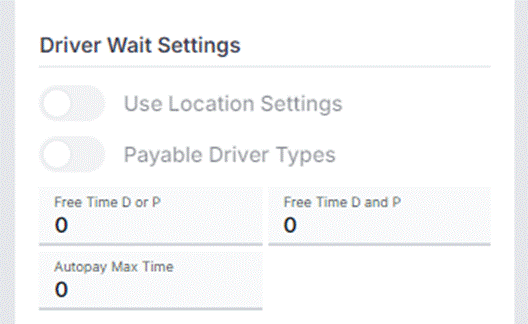
The Driver Wait Settings section contains location-specific controls that determine how driver dwell and wait time is evaluated for pay when activity occurs at this location through the Driver Dwell Portal.
Use Location Settings
Enable location-specific wait time rules.
Y (Enabled): The Driver Dwell Portal will apply the wait time rules defined for this specific location.
N (Disabled): Location-specific rules are not applied; system or default wait time rules will be used instead.
Payable Driver Types
Defines which driver types are eligible for wait time pay at this location.
C = Company Drivers
O = Owner Operators/Independent Contractors
A = All Drivers
Only the selected driver types will qualify for wait time pay when dwell events are recorded at this location.
Free Time D or P
Unpaid wait time allowance for either a Drop OR a Pick event within the Non-Reporting Pool (NRP).
Configured in minute increments
Time within this threshold is not payable
Free Time D and P
Unpaid wait time allowance when both Drop AND Pick (multiple pros) occur within the Non-Reporting Pool (NRP).
Configured in minute increments
Applies when both activities are completed at the same location
Autopay Max Time
Defines the maximum number of minutes eligible for automatic wait time pay.
Configured in minute increments
Wait time exceeding this threshold will not be automatically paid and may require review or manual handling
When a Location Profile is configured in the Driver Dwell Portal, these Driver Wait Settings act as the pay calculation rules for that location.
The portal evaluates:
Driver type eligibility
Applicable free time thresholds
Maximum autopay limits
Based on these values, the system determines if wait time is payable, how much time qualifies, and whether payment can be processed automatically.
Driver Wait Settings only apply when Use Location Settings = Yes.
All time values must be entered in minutes.
Once a Location Profile record has been added, changes to the settings are permission controlled at the VP level or higher.
REMINDER: These settings are location-specific and may differ from other locations or default system rules.
TIP: Changes to Driver Wait Settings will impact future dwell events occurring at the location once saved.
