The Depot Association option allows you to link a Location Profile to an IMC Depot and its associated customers.
This relationship ensures the location is properly configured for depot-related processes and visibility within the system.
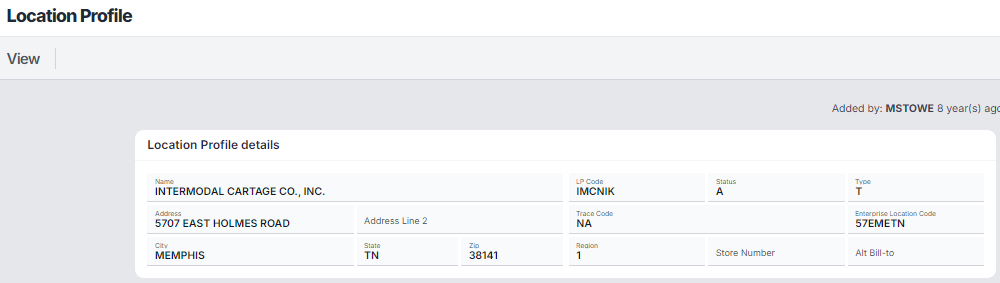
Before accessing Depot Association, the user must first query a Location Profile.
From SWS main menu go to Customer Service, left click on File Maintenance, then left click on New Location Profile Screen.
In the example above, the location details are displayed including:
Name: INTERMODAL CARTAGE CO., INC.
LP Code: IMCNIK
Address: 5707 EAST HOLMES ROAD, MEMPHIS, TN 38141
Status: A (Active)
Additional details such as Region, Time Zone, and Lat/Long
This confirms you are working with the correct location before applying any settings.
Query and display the desired Location Profile
Select Settings (top menu)
Choose Depot Association
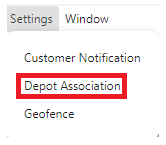
Once selected, the Depot Associations screen is displayed.
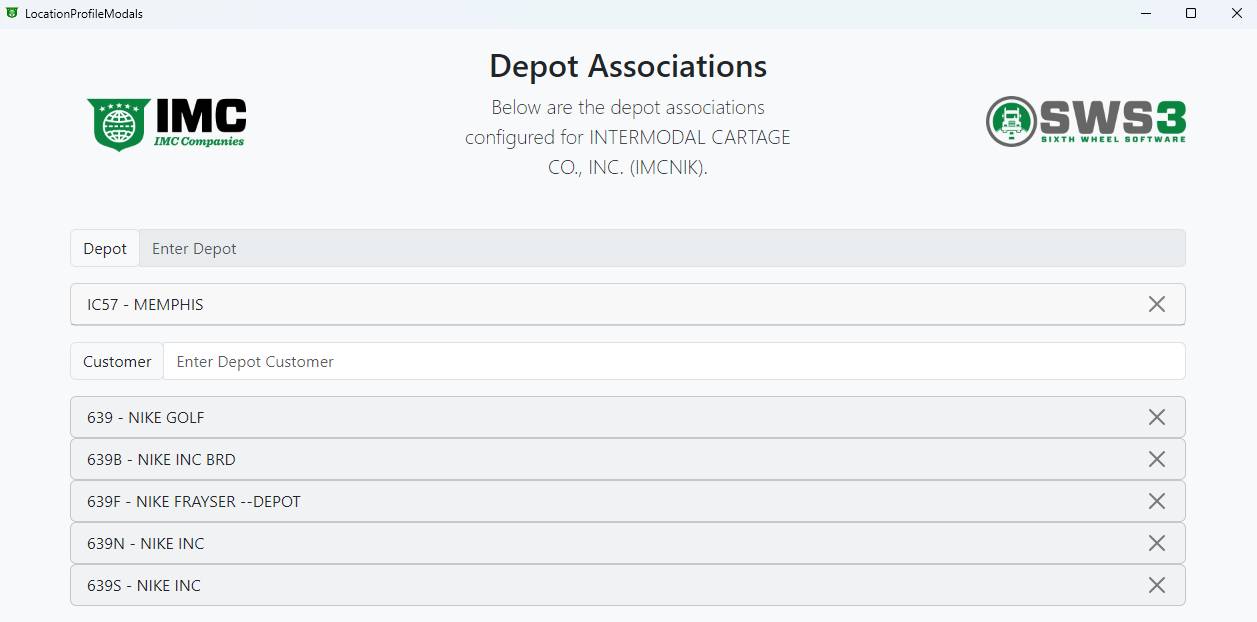
Displays Depot Associations
Identifies the current location/customer context
Example: INTERMODAL CARTAGE CO., INC. (IMCNIK)
Field: Enter Depot
Used to search for and select a depot
Example Selection:
IC57 – MEMPHIS
Selected depot appears as a row with a remove (X) option
Field: Enter Depot Customer
Used to search for customers associated to the selected depot
Example Customers:
639 – NIKE GOLF
639B – NIKE INC BRD
639F – NIKE FRAYSER --DEPOT
639N – NIKE INC
639S – NIKE INC
Each customer appears as a separate selectable row
Each row includes an “X” icon to remove the association
Click into the Enter Depot field
Search for the appropriate depot
Select the depot from the list
✔ The depot appears below the field (example: IC57 – MEMPHIS)
Click into the Enter Depot Customer field
Search for the relevant customer(s)
Select one or more customers
✔ Each selected customer is added as its own row
Confirm:
The correct Depot is selected
All required Customers are associated
Select the “X” icon next to any depot or customer to remove it
After completing the setup:
The Location Profile is linked to the selected IMC Depot
Associated customers are tied to that depot/location
The location is now properly configured for depot-related operations and visibility
A Location Profile must be queried first before accessing Settings
Depot Association is applied to existing locations only
A location can be linked to:
One depot
Multiple depot customers
Customers should align with the selected depot
Always verify the Location Profile details before making changes
Confirm the correct depot before adding customers
Add all applicable customers during setup to avoid incomplete configurations
Remove outdated associations as soon as changes occur
Ensure consistency in depot/customer selection
