To access the Doc Audit Portal, go to:
Upon launch of the portal, “Rejected” is the default status. The current status will display at the top center of the portal. (As below)

Users will have five (5) statuses to choose from under the “DocAudit” dropdown located at the top right of the page upon launch of the portal. Left click on the dropdown, then left click on the desired status name to select. (As below)
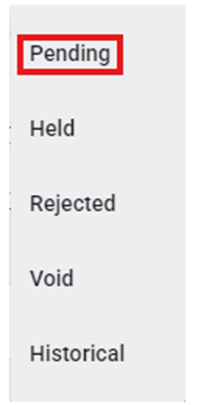
“Pending” status will display those documents that are in the queue waiting for Audit. To view a particular Pro in “Pending” status, left click on the line to open the document viewing and (if applicable) action window.
Left click on the “Cancel” button at the bottom of the page to return to the list of Pending Docs. (As below)