
Order Entry – Deferring an Order
From SWS main menu go to Customer Service, click on Order Entry, then click on Order. Next, type a “Q” for “Query”. Type the Div/Pro for the Pro # you wish to defer and hit the “Esc” key to display the Pro.
Next, type a “U” to “Update” then hit the “F7” key to Defer the Order. NOTE: This “F” key function shows in white at the bottom of the order Screen
The below box will display:
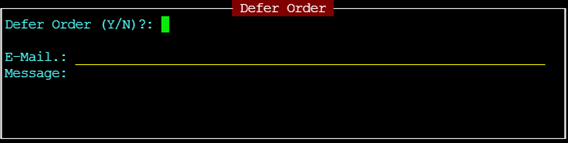
Escribe una "Y" para Sí y presiona la tecla "Enter". El cursor avanzará automáticamente al campo E-Mail.: y el nombre de usuario del CSR para ese Pro se completará automáticamente. (Ejemplo abajo)
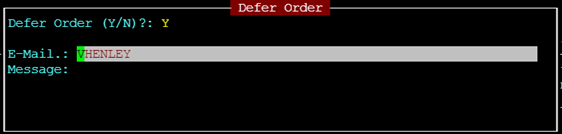
NOTA: Un correo electrónico se enviará automáticamente al CSR en el Pro incluso si se elimina o se sobrescribe con otro userid. Si deseas enviar un correo a más de un nombre de usuario, separa cada uno con un espacio o una coma.
Si no deseas agregar un mensaje, presiona la tecla "Esc". Un correo se enviará automáticamente al CSR como en el ejemplo abajo:
Orden 61-107446 Deferred Shipper: GACIPO Consignee: MACA12
USER: "DMURPHY" No ingresó un Mensaje (solo usuario de ejemplo)
Si deseas agregar un mensaje o nota al correo, presiona la tecla "Enter" para avanzar el cursor a la línea "Message". (Ver ejemplo abajo)
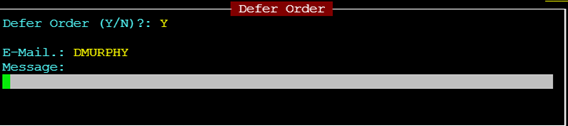
You may enter a line or line(s) of text if desired. This text will appear on the system generated email.
After you have completed typing any message (if applicable), hit the “Esc” key twice. The Pro status will update to “X DEFERRED”as below:

Removing Deferred Status from an Order
From SWS main menu go to Customer Service, click on Order Entry, then click on Order. Next, type a “Q” for “Query”. Type the Div/Pro for the pro you wish to remove from Deferred status and hit the “Esc” key to display the Pro.
Next, type a “U” to “Update” then hit the “Esc” key.
Next, hit the “F7” key. The below box will display.
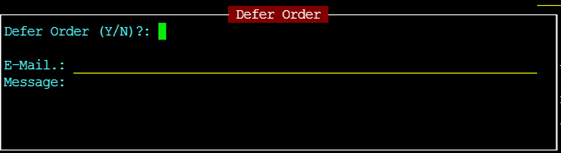
Type a “N” for No. If you wish to email another user other than the CSR on the order hit the “Enter” key. Follow the same steps you would when deferring a pro. When finished hit the “Esc” key. The below message will display on the screen:

Type a “Y” for Yes and hit the “Enter” key. Deferred status will be removed and the order status will default back to the status it was prior to being deferred.