
Pantalla de Pedidos F10 – Líneas de Negocio (LOB)
Usar la función F10 desde la pantalla de pedidos te permitirá consultar las Líneas de Negocio o mostrar esta información desde cualquier Pro consultado. NOTA: Este campo se completa con información encontrada en el EDI 204 Load Tender.
Desde el menú principal de SWS ve a Customer Service, haz clic izquierdo en Order Entry, luego haz clic izquierdo en Order. A continuación, escribe una Q para Consultar. Luego, presiona el botón F10 Shpmnt Detail. (Como se muestra a continuación)

The below screen will display:
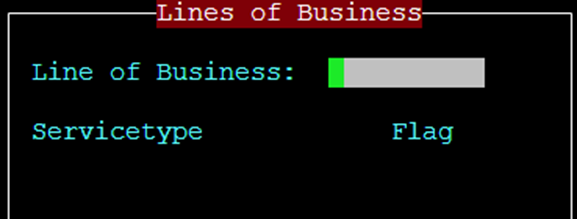
Users can Query (not Update) the “Line of Business” (LOB) field using four (4) different criteria:
FAK – Freight All Kinds
KA – Key Accounts
HCR – Healthcare/Reefer
TRNSLD – Transload
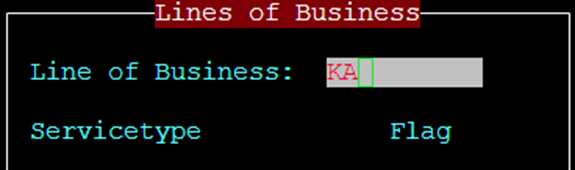
Type the desired LOB criteria above in the “Lines of Business” field, then press the <Esc> key. The below information will populate including the number of records (Pros) matching that criterion.
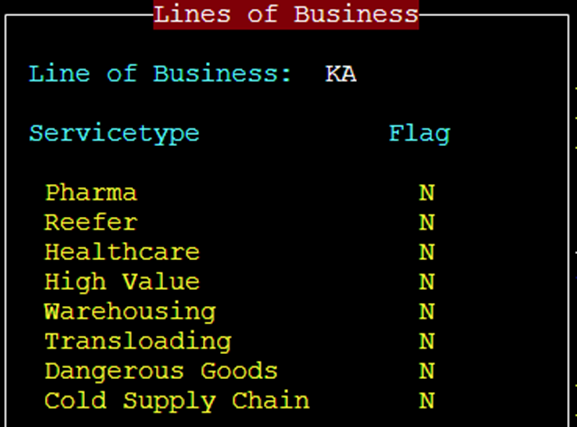

Additionally, when a Pro (or Pros) have been queried, press the F10 Shpmnt Detail button to view the “Lines of Business” for that Pro.
NOTE: Service Types cannot be queried at this time. In future, these flags will be an indicator of the driver type to assign to the move.